
Brand
Brand kit v1.0 (October 2026). Source files and the full Spanish guide are in packages/brand.
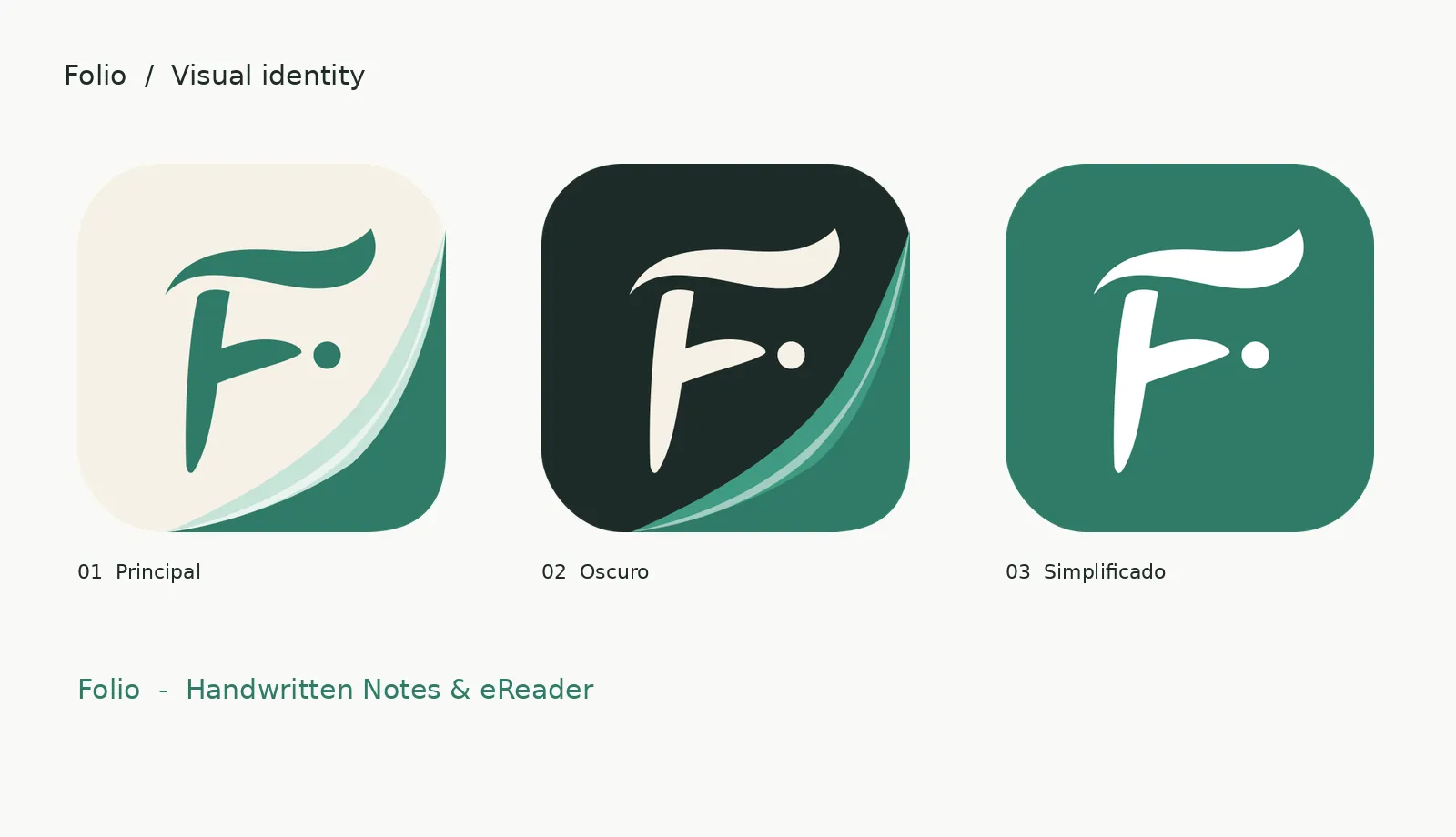
Concept
Writing meets reading. The «F.» keeps Folio’s calligraphic gesture: the flowing F is spontaneous handwriting, the dot is the pen touching the page, and the folded corner is a book becoming a personal notebook.
Personality: calm, human, focused, warm, smart, tactile and contemporary. Avoid a childish look, excess detail and visual technicality.
Logo system
| Variant | File | Use |
|---|---|---|
| Primary | svg/folio-icon-primary.svg |
Sage F on cream paper with the fold. Web, covers, press, store |
| Dark | svg/folio-icon-dark.svg |
Dark backgrounds and high contrast |
| Flat | svg/folio-icon-flat.svg |
White F on sage. Launcher, small sizes, where the fold does not read |
| Symbol | svg/folio-symbol-*.svg |
One colour. Engraving, print, favicons, watermarks |
| Lockups | svg/folio-lockup-*.svg |
Icon, name and subtitle, vertical and horizontal |
Colours
| Colour | Hex | Use |
|---|---|---|
| Sage (primary) | #2F7A68 |
The F, buttons, brand elements |
| Ink (text) | #1E2B28 |
Headings and text |
| Cream (paper) | #F6F1E6 |
Warm surfaces, main background |
| Sage soft | #E3EFEA |
Light backgrounds, selection |
| White | #FFFFFF |
Neutral backgrounds, inverted symbol |
| Fold mint | #C7E3D8 |
Fold detail in the illustrated icon |
Brand colours do not replace a WCAG contrast check for small text.
Type
Geist (Medium or SemiBold) for the word «Folio» and the app interface; Inter is the alternative. Semibold titles, regular text, generous spacing.
Size and clear space
- Keep at least 12 % of the icon width clear around the symbol when it has no container.
- Minimum size: 32 px flat, 64 px for the illustrated fold.
- Nothing may touch the F’s curves or the dot.
- Android: 108 dp adaptive icon with the mark centred and a monochrome layer.
Do not
Stretch or rotate the F, separate the dot, add strong shadows, change the sage, add arbitrary gradients, or put a second book or pencil icon on top. Do not place the cream version on light backgrounds without a border or enough separation.
Decision: the primary icon is Folio’s icon
2026-10-19. The owner prefers the primary icon (sage F on cream paper with the folded corner) over the flat one (white F on sage). It is now the app’s icon everywhere it is shown, including the store listings:
| Where | Asset |
|---|---|
| Android launcher | Primary icon: cream adaptive background, fold and F in the foreground, white-F monochrome layer for themed icons |
| Google Play app icon (512×512) | packages/brand/png/folio-store-primary-512.png (full bleed, opaque, no rounded corners: Play applies its own mask) |
| App Store icon (1024×1024) | packages/brand/png/folio-store-primary-1024.png, also in apps/mobile/iosApp/iosApp/Assets.xcassets/AppIcon.appiconset/app-icon-1024.png |
| In the app (About) | folio_icon_primary.xml |
| Website | Landing logo and Starlight logo use folio-icon-primary.svg; the favicon is the one-colour symbol |
The flat icon stays in the kit for places where the fold cannot read, below about 64 px: tiny favicons, notification icons and watermarks. The kit’s own folio-play-store-512.png and svg/folio-play-store-full-bleed.svg are the flat version and are not used for the store.
Source: packages/brand/svg/folio-store-primary-full-bleed.svg. Re-export with rsvg-convert -w 512 -h 512 svg/folio-store-primary-full-bleed.svg -o png/folio-store-primary-512.png.
In the app
| Where | What |
|---|---|
| Launcher | Primary icon (sage F on cream with the fold) and an Android 13 themed (monochrome) layer |
| Launch screen (Android 12+) | Primary icon on cream |
| Library | Cream paper background, white cards, sage accent (default), Geist type |
| Sidebar | Sage «F.» symbol and the «Folio» wordmark in Geist SemiBold |
| About | Primary icon, name and «Handwritten Notes & eReader» |
| Editor and reader | Ink #1E2B28 chrome on white paper |
Code: FolioBrand (colours), folioTypography() (Geist), FolioSymbol and FolioIcon in apps/mobile/shared/src/commonMain/kotlin/com/allient/folio/FolioBrand.kt.